Using the Hosted Development Backend
To allow users to use their account for your application, TwiWorks offers a variety of login methods. These methods include a hard-coded token, local login and backend-based authentication. You can read more about these login methods in this section, but for this quickstart guide we'll use the Hosted Development Backend.
The Hosted Development Backend is a version of the TwiWorks backend that is hosted by us. It allows you to quickly get started with TwiWorks without having to worry about setting up your own servers. This service is provided as-is with no guaranteed intended solely for development use. It should not be used for games that are released to the public.
Configuring your project to use the Hosted Development Backend
Start by heading to the TwiWorks settings (Edit -> Project Settings -> Plugins -> TwiWorks). In here, look for the Authentication section show below.
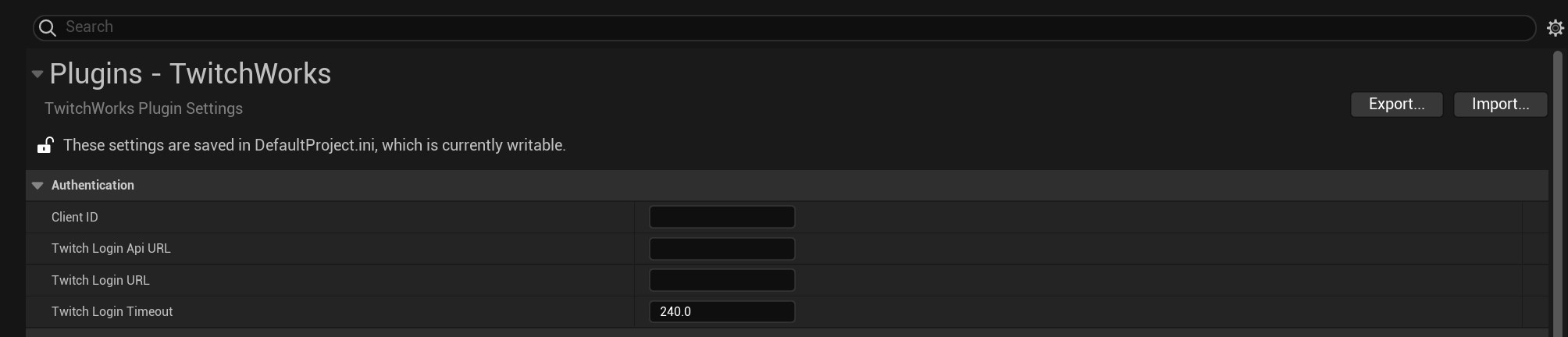
To use the Hosted Development Backend, simply update the values for Client ID, Twitch Login Api URL and Twitch Login URL to the values shown in the table below.
The Hosted Development Backend is not intended for released games.
The Hosted Development Backend is currently experiencing an outage. You may wish to you the local login system instead.
| Item | Value |
|---|---|
| Client ID | th5jk3y5dkwba4ezn8ib3v7wlgwfo3 |
| Twitch Login Api URL | https://twiworks.h2cstudios.com/twitch_integration_api |
| Twitch Login URL | https://twiworks.h2cstudios.com/perform_twitch_auth |