Connecting to a database
The first thing you’ll probably want to do when using NetDB is connecting to a database. In order to connect, you’ll first need to gather a few bits of information about your database. These are:
We recommend only accessing databases on your Server only - be careful about storing credentials. Need a way to load your DB credentials at runtime? Check out ConfigBP!
- The IP/FQDN of the server you’re connecting to.
- The port the PostgreSQL server is running on (default:
5432). - The username and password you want to use.
- The name database you want to connect to.
Once you’ve collected those, place the Connect to PostgreSQL Database node, and plug the values into the correct fields. We highly recommend connecting a Branch node to the Was Successful output. This will allow you to catch connection issues before trying to use your database, avoiding potential crashes/unexpected behavior. You can see an example of the connection node below:
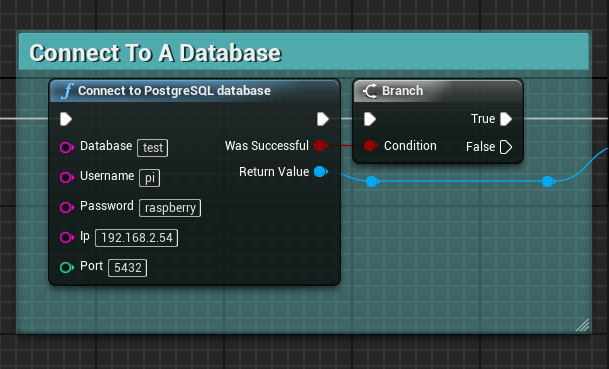
Now if you run your blueprint, it should connect to the database! You can check your Output Log to see if there are any errors. A common error will look like the following:
LogTemp: Error: Error Connecting To Database! Error: could not connect to server: Connection refused (0x0000274D/10061)
    Is the server running on host "127.0.0.1" and accepting
    TCP/IP connections on port 5432?
This error usually means that your PostgreSQL server isn’t running, or that you are using the incorrect IP/port. Please double check these, and if not, head to the troubleshooting section. If you don’t see any errors, you’re ready to start using the database!