The Asynchronous Workflow
When you start executing larger queries, these may take more time to execute. As a matter of fact, these may take so long that your game/server appears to start hanging. In order to resolve this issue, we've created an asynchronous workflow that allows you to connect to a database, and/or execute a (prepared) SQL Query without it blocking your game thread!
Before we dive in, I'd like to issue a quick word of caution. You CAN NOT execute two asynchronous SQL queries on the same connection at the same time. We're currently working on a solution to better deal with this issue, and hope to have one ready soon.
Furthermore, please note that the Unreal Engine 4.19 NetDB version is currently the only version that supports Asynchronous queries. Be sure to update to the latest version of NetDB using the Epic Games Launcher before continuing.
Now that that is out of the way, we can dive into the world of Asynchronous NetDB, starting with connecting to the database. This node is especially useful when dealing with a slow(er) connection to your database, and works roughly the same as the Connect to PostgreSQL Database node that we used before. The key difference is the (Async) part added to the end of the name, and the new "On Success" and "On Fail" pins that it has. Once you place it onto your blueprint graph, and add your credentials it should look a little like this:
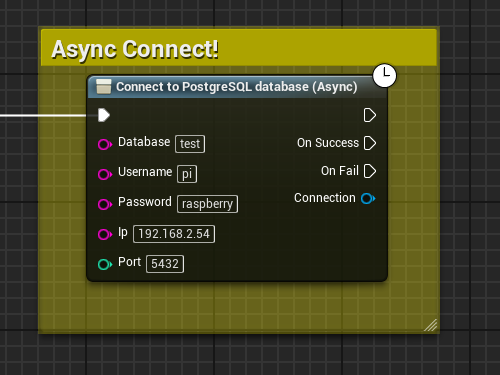
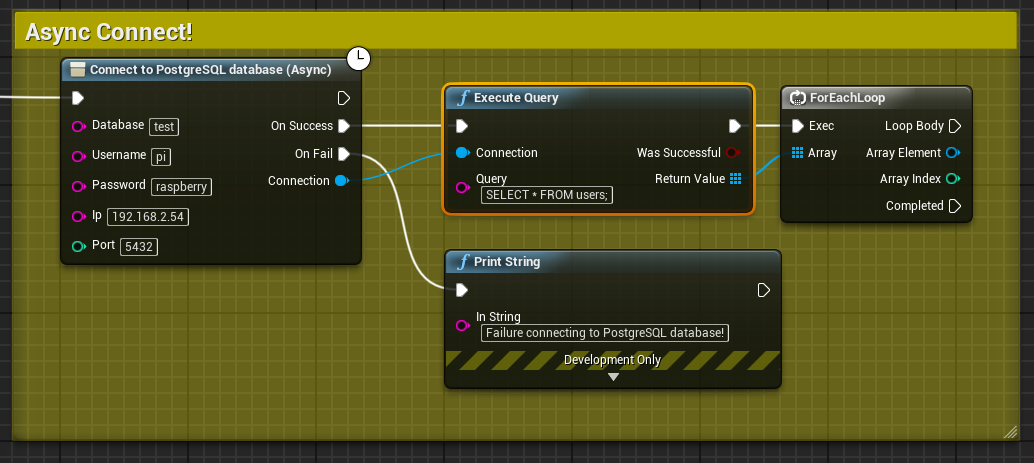
Now be careful to NOT hook any database actions (like executing a SQL Query) up to the "default" output execution pin, and only to the On Success pin. You should handle an issue connecting (the On Failure pin) without using the Connection output, since this value won't contain a valid connection. An example of it being implemented can be seen below:
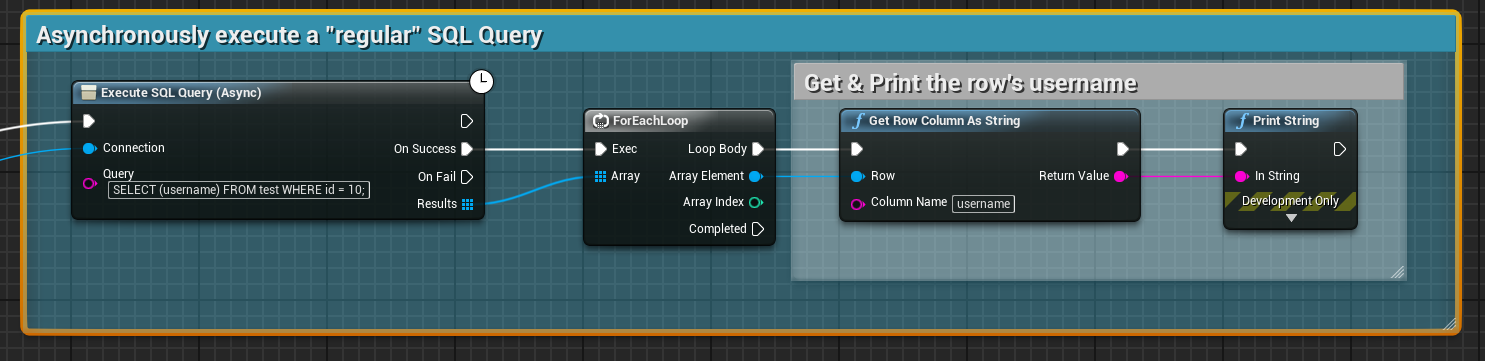
Now we also have the ability to asynchronously execute a "regular" SQL query, and execute a prepared SQL query. The usage of these nodes is roughly the same as for their non-asynchronous counterparts, but you're responsible for making sure you DO NOT EXECUTE MULTIPLE QUERIES AT ONCE(!). I won't cover these as in-depth as done before (please refer to the Regular SQL Queries and Prepared SQL Queries sections for more information on them), but I will provide an example of them both being used to select my user's username, with id=10 from the test table.
The query being used for our regular SQL query will be:
SELECT (username) FROM test WHERE id = 10;
Which results in the following arrangement of nodes to get my user:
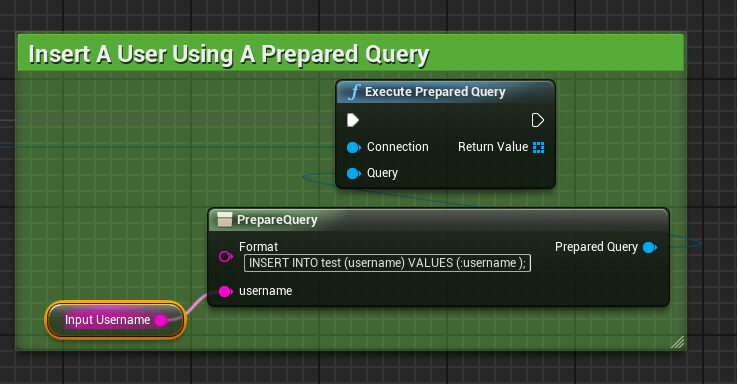
And to do this with a prepared query, I'd use the following SQL query:
SELECT (username) FROM test WHERE id = :user_id ;
Which gets passed into the regular/non-asynchronous PrepareQuery node, and then into the asynchronous prepared query execution node as shown below:
This should help you get started with using NetDB in an asynchronous manner! Please note that you do not need to connect asynchronously to use the asynchronous query nodes, but we do highly recommend the usage of the "Connect to PostgreSQL Database (Async)" node.