Prepared Queries
We’ve finally arrived at one of the most important sections in this document! Prepared Queries enable you to mitigate the risk of a SQL Injection. But first, what is a SQL Injection?
SQL injection usually occurs when you ask a user for input, like their username/userid, and instead of a name/id, the user gives you an SQL statement that you will unknowingly run on your database.
— W3Schools (https://www.w3schools.com/sql/sql_injection.asp)
In other words: it allows hackers to essentially execute anything they want on your database, including queries that may expose your players’ data and/or delete your database as a whole!
To protect against this, databases have implemented something called Prepared Queries. This is a mechanism that allows you to separate the SQL code and the (user-provided values), making sure your database can't get the two confused when a user tries to take advantage of the system. NetDB has support for this kind of query, and makes it easy to use with dynamic nodes that work a lot like the format text node. Convinced you'd like to use prepared queries in your next project? Great choice, let's go!
Creating a Prepared Query
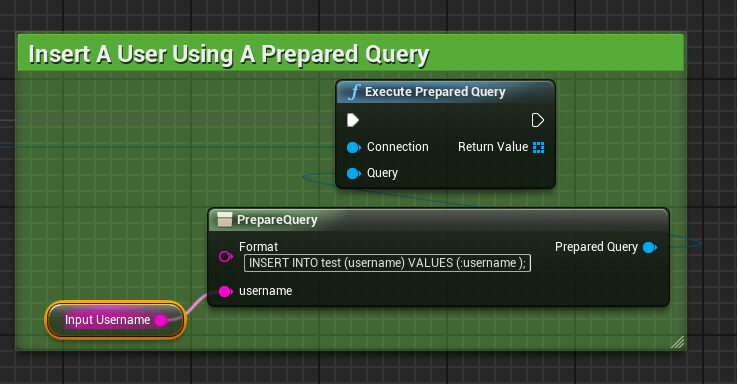
To execute a prepared query, drag an Execute Prepared Query node out of your connection, and NOT an Execute Query node. Now drag out of the Query parameter and place the PrepareQuery node. This contains a Format parameter, and this is where you start defining your prepared query. Prepared queries inside of NetDB use the colon character (:) to announce that you'd like to introduce a variable. After this colon, type the name of the parameter you'd like to introduce and finally add a space after you're done. To avoid issues, please stick to lower-case letters only for your variable names, and make sure you add a space after you're done. As an example, for a variable called myvar, we'd have:
:myvar
So if you recall our inserting a username example from the Inserting Records Into The Database section, we’d change the original SQL query:
INSERT INTO test (username) VALUES ('foobar');
into the following prepared query:
INSERT INTO test (username) VALUES (:username );
When you have entered the Format string, you should now be greeted with a new pin with the same name as your variable, username in the example case. If your variable name contains part of the remaining SQL query, please ensure that you have added an additional space after the ending of the name. The example prepared query would look like this inside of Unreal Engine: