Low-level Interface
In this section we'll be discussing the low-level interface RSSFeeder provides. Please not that though this does provide a greater level of control, it can also be harder to use, so if you're using RSSFeeder for the first time, or are new to using RSS Feeds/UE4 Blueprints we highly recommend you use the high level interface, as described in the Using RSSFeeder section.
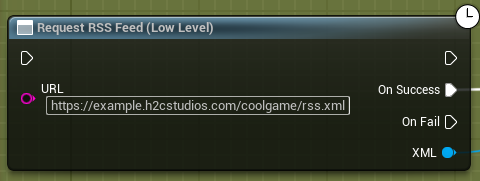
So to use the Low Level interface, we first need to start by getting the feed. This is done by using the Request RSS Feed (Low Level) node. As before, choose a URL of your choice. Now the key difference here is that instead of returning the feed's metadata and articles, it returns an XML object. This object is the root node of your RSS feed, namely the <rss version=X> part. To help illustrate some of the points/procedures, I'll be using the following example feed:
<?xml version="1.0" encoding="UTF-8" ?>
<rss version="2.0">

<channel>
  <title>The HowToCompute Cool Sample Pages</title>
  <link>https://example.h2cstudios.com/webtest</link>
  <description>HowToCompute's very own sample pages!</description>
  <item>
    <title>Updates to CoolGame</title>
    <link>https://example.h2cstudios.com/webtest/page1.html</link>
    <description>Updates to CoolGame! New map and more!</description>
  </item>
  <item>
    <title>CoolGame v1.0.2 Changelog</title>
    <link>https://example.h2cstudios.com/webtest/page2.html</link>
    <description>CoolGame v1.0.2 Changelog</description>
  </item>
</channel>

</rss>
So to start off, I'll want to get access to the "channel" node. To do this, RSSFeeder exposes the "Get Node Child" node. This takes in a (parent) parent, and the name of the child object you want to get at. In our example of wanting to get the channel node, we'd pass it the XML node returned from the feed request, and the name, "channel" as can be seen below:
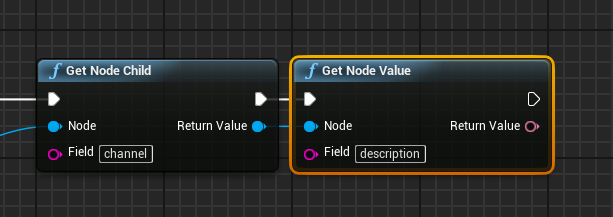
Now if we want to get access to the value of one of its children, we'd use the "Get Node Value" node. If we'd want to get the channel's description, continuing the example from above, we'd pass in the return value from "Get Node Child" to the "Get Node Value" node, and use "description" as the Field. You can see this below:
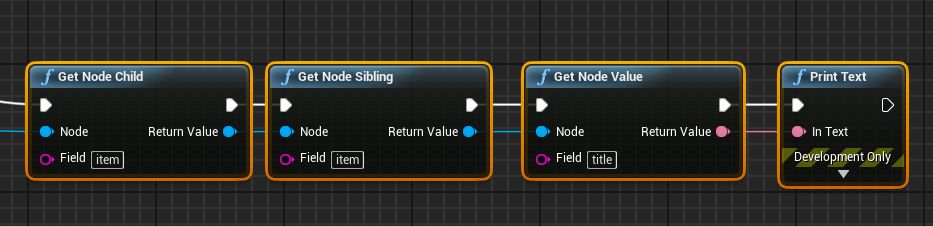
Now when dealing with multiple nodes with the same name, forming a notion of an array, we can use the get node sibling node to iterate over them. The first step is (generally) to get the first child in the array, to do this use the "Get Node Child" as described above. Now once you have that, you can get the next object in the "array" using the "Get Node Sibling" node. Connect the current sibling you're iterating over there, and the same Field value as before. An example of getting the second item, and then getting it's title can be seen below:
The node connection coming all the way from the left is from the Get Node Sibling (channel) node.
This covers the basics of RSSFeeder's Low-Level operation, but again, we highly recommend sticking to the high-level interface wherever possible. If you have any further questions or suggestions about the low-level interface, please reach out to us.